Somebody's knocking on your door at 3 a.m. Here's who.
A consumer endpoint monitor for Windows that keeps a permanent record of every
outbound connection your machine makes, reconstructs the chain of events that
caused it, and tells you what happened in a sentence you can actually read.
Your antivirus gives you a receipt. Not an answer.
"Threat quarantined." Great. What was it? How did it get on the machine? What did it
touch before you caught it? Did it send anything anywhere? Consumer security tools
answer none of that, because answering it requires remembering what happened — and
they don't.
What you get today
"Trojan:Win32/Wacatac.B!ml quarantined."
You are exactly as informed as you were before it appeared. There is nothing to
click, nothing to read, and no way to find out what it did between arriving and
being noticed.
What NiteWatch tells you
"You opened invoice.pdf in Acrobat, which started powershell.exe,
which connected to a server in Moldova and began rewriting files in your
Documents folder."
Same event. The difference is that one of them is a story with a beginning, and
you can decide what to do about it.
What it actually does
Four things, done properly.
01
The connection ledger
Every outbound connection, attributed to the program that made it: which
executable, which destination, which domain, how much data moved in each
direction, and when. It's process-attributed netstat that remembers — sortable,
filterable, and still there tomorrow. Not a firewall popup you dismiss at 2 a.m.
02
The causal chain
NiteWatch doesn't just record events, it records what caused what. Click
any connection and it walks the chain backwards: the program, what started it,
the lookup that produced the address, the files touched around the same moment.
This is the part nothing else in the consumer market does.
03
Alerts written for humans
Every alert is a hand-written narrative plus a numbered playbook — what happened,
why it matters, and what to do first. Written per rule by a person, never
generated on the fly. When minutes matter, step one is the step that limits the
damage.
04
Response you authorise
Stop a process, block an address, quarantine a file, remove a startup entry —
each one behind an explicit click, each with an undo path where the operating
system allows one. NiteWatch advises. You decide. It never acts on its own.
Screenshots
The actual thing, not a mockup.
Every image below is a photograph of the running agent. The events behind them are
a synthetic trace — an ordinary evening's browsing, chat and music, plus one program
doing something it shouldn't — but the trace is replayed through the real ingest,
the real causal graph and the real rules. The words in these pictures are the words
the product produces. Nothing has been retouched.
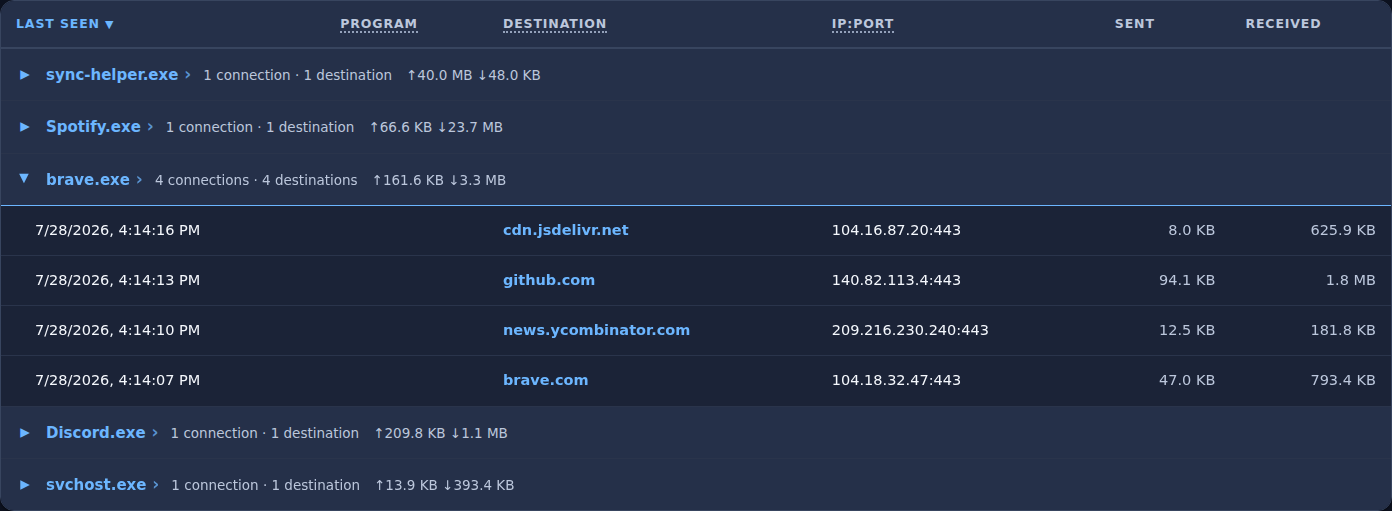
The ledger. Every outbound connection, grouped by the program that made
it. Note the top row: 40 MB up and 48 KB down, against every other
program on the machine being download-heavy. You don't need to know what
rootlayer.net is to know that shape is wrong — and volume is the one
thing about an encrypted conversation that's always visible. Columns are yours
to choose; a laptop can't fit eleven of them.
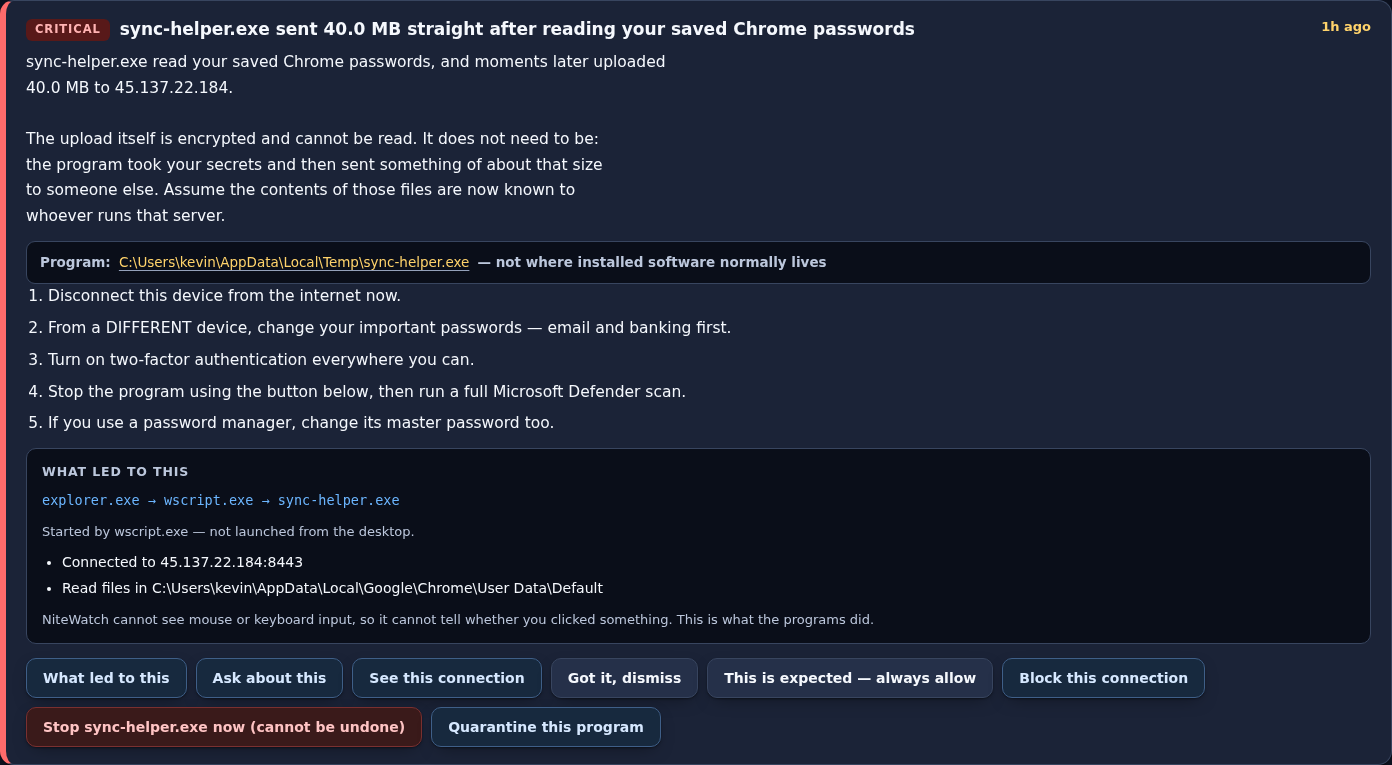
An alert. What happened, what it means, and a numbered playbook whose
first step is the one that limits the damage — disconnect, then change passwords
from a different device. Underneath, the chain that produced it. Every
word of this is written by a person in advance and shipped in the rule file
beside the logic that fires it. No language model is anywhere near the alert
path.
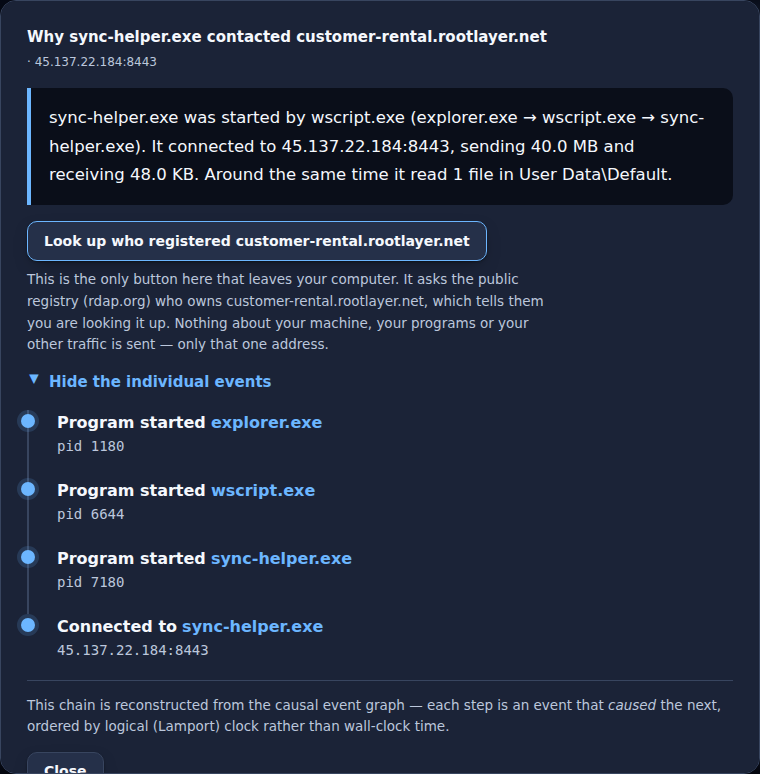
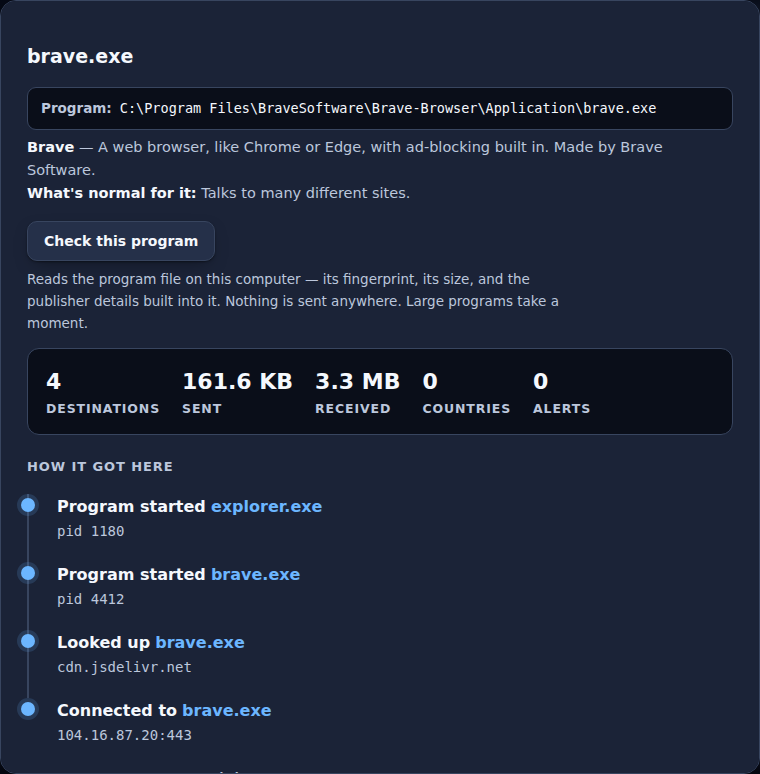
The causal chain. Not a log filtered by PID — a reconstruction of what
caused what, ordered by logical clock rather than wall time, because the
operating system delivers these out of order and stamps them with the same
millisecond. The one button that leaves your computer says so, names exactly
what it will send, and does nothing until you press it.
Explain everything. A toggle that describes 52 common programs in plain
English and defines the jargon — PID, port, signature — for anyone who doesn't
work in this field. Off by default, because being told what a browser is every
time you look at one gets old fast.
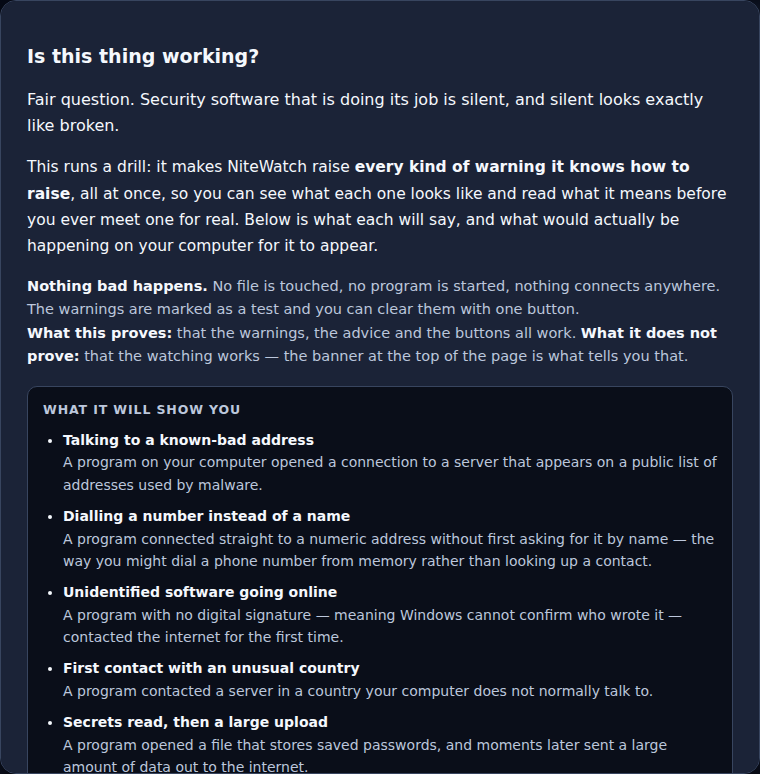
Test me. Security software doing its job is silent, and silent looks
exactly like broken. One click fires all fourteen warnings so you can read what
each means before meeting one for real. Nothing is touched, started or sent;
the warnings are marked as a drill and clear with one button.
The limitations and the roadmap ship inside the binary. Not on this
website where they can quietly diverge from what you're running — in the build,
describing that build. What it can't do, and what's coming, one click from the
dashboard.
Two columns are blank in the ledger shot — Owner and Country. That's an
artefact of replaying a trace faster than the address-ownership dataset can load, not
a missing feature; on a live machine they populate within seconds of startup. It felt
more honest to say so than to stage a screenshot around it.
The differentiator
"Why did that just happen?"
Under the hood, NiteWatch builds a causal event graph — a partially-ordered set with
logical clocks, so it can establish that A caused B even when the operating system
delivers them out of order or stamps them with the same millisecond. That graph is
what makes the following sentence possible.
A connection, explained
You started brave.exe from explorer.exe. It looked up
upload.example.com, connected to upload.example.com (93.184.216.34:443)
— a network operated by FASTLY (US) — sending 4.1 MB and
receiving 120.1 KB. Around the same time it read 14 files in
Pictures\holiday.
That is generated text, but it isn't guesswork: every clause is grounded in an
observed event. Where the graph can't support a claim, the sentence doesn't make
it — a program whose parent was never seen is described as "was already running,"
not "you started." Confident wrongness is how security tools lose people.
Detection
Fourteen rules, four packs.
Rules are data, not code — readable YAML with the narrative and playbook written
alongside the logic, so what fires and what it tells you live in the same file.
Here is the whole shipped set. Not a category list: the actual rules.
c26 rules · command & control
A destination appears on a public malware-infrastructure feed
A program connects to a raw IP address it never looked up
An unsigned program makes its first contact with the outside world
First contact with infrastructure in an unexpected country
An upload immediately after reading credentials or key material
Connections on a metronome — the rhythm of a check-in schedule
persistence4 rules · surviving a reboot
An image-hijack registry key pointed at a different binary
An existing autostart entry silently replaced
Something set to start from a temporary directory
An unsigned program added to startup
ransomware3 rules · your irreplaceable files
Mass encryption confirmed — files are being rewritten right now
Mass file modification suspected — fast, wide, and worth checking
Backup destruction — something is deleting your ability to recover
credentials1 rule · secrets at rest
A program reading the browser password stores or key material
Thresholds are set by measurement, not intuition. The beaconing rule waits for
fifteen check-ins before it says anything, because eight produced eight false alarms
per three hundred sequences of ordinary irregular browsing and fifteen produced
none. The cost is catching a one-minute beacon on its fifteenth call instead of its
eighth. That trade is the right way round: a security tool that cries wolf gets
turned off, and a tool that's off catches nothing.
Privacy
Intelligence comes down. Nothing goes up on its own.
A tool that watches everything you do has to be held to a higher standard than the
thing it's protecting you from. These are architectural commitments, not policy
promises — they're enforced in the code and covered by tests.
Analysis happens on your machine. Threat feeds and the address-ownership
dataset are downloaded whole, then matched locally. Nothing automatic ever asks a
third party about a specific address, because the question itself would reveal
where you've been.
Two outbound queries exist, and both are yours to make. "Who owns this?"
asks a public registry who holds one destination. The optional reputation check
sends one file fingerprint — a SHA-256, no file, no filename, no path — to
VirusTotal, and only works if you supply your own API key, so the account doing
the asking is yours. Neither ever fires on its own: not on ingest, not on a timer,
not on page load. Each button states what it will send and to whom before you
press it, and results are cached so a second look doesn't repeat the disclosure.
"Ask about this" sends nothing. Any alert can be turned into a written
question for the assistant, forum or knowledgeable friend of your choice — with an
option to strip your username first. NiteWatch puts it on your clipboard and shows
you the exact text. You do the sending, or you don't.
The dashboard is loopback-only. It binds 127.0.0.1, validates the Host
header against DNS-rebinding, and requires a token stored owner-readable on disk.
No kernel driver. Ever, in this product line. NiteWatch observes and
advises; it never sits in the path of an operation. That's a real capability
limit, accepted deliberately — a bug in a kernel driver is a bug in your kernel.
No automatic response. Every remediation requires a click. A false positive
that kills a process you needed is worse than the malware it was guessing at.
Where it actually is
In development. Here's what doesn't work yet.
The flight recorder, the causal graph, the rule engine, the alert UX and one-click
response are built and running on Windows — along with the plain-English layer, the
drill, the reputation check and the documents that ship inside the binary. That's
the part worth being pleased about. This is the rest of it, because you'll find out
anyway and you should hear it here first.
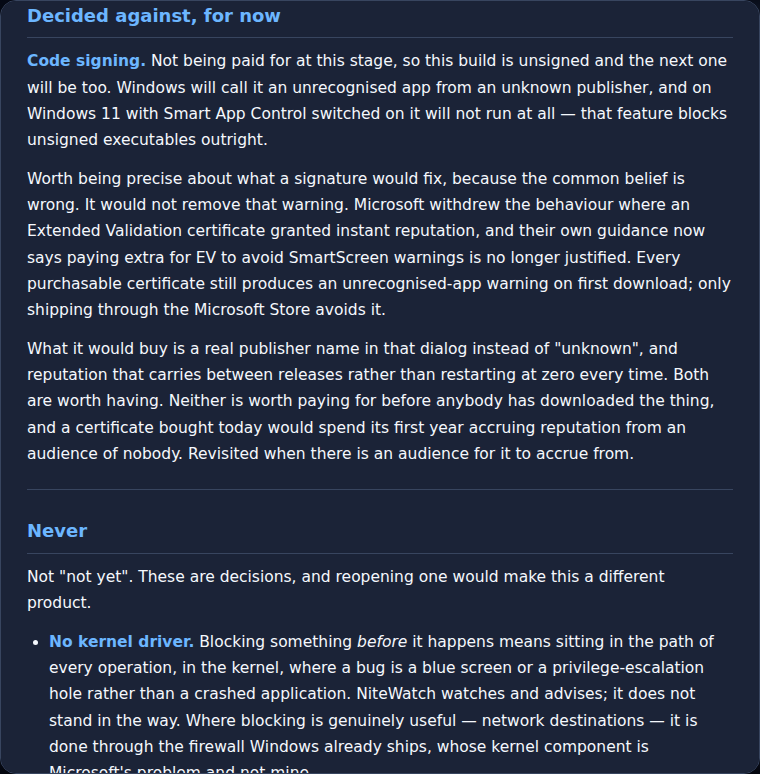
The binary is unsigned, and will be. Windows will call it an unrecognised app; Smart App Control will refuse to run it. Why, and what it costs you.
No installer and no service. It's a console app you start by hand, which means it isn't watching when you aren't looking.
The database sits beside the executable. It belongs in %ProgramData% with an access-control list, and that waits on the installer.
No command lines or file hashes. The telemetry source doesn't supply them.
File watching covers your user profile. Other drives are out of scope.
The false-positive rate is unmeasured over a long real session — and it's the number that decides whether the tuning is right.
Threat-feed licensing isn't settled. Several good sources aren't usable commercially without written permission.
You don't have to take that list on trust, and you shouldn't have to come back here
to read it. It's compiled into the build, one click from the dashboard, alongside
the roadmap — so it describes the version in front of you rather than whatever this
page said the day it was written.
None of that is a reason not to build it. All of it is a reason not to tell you
it's finished.
One thing on that list isn't on it: Windows. NiteWatch is a Windows
product and is staying one. macOS and Linux were properly assessed and taken
off the roadmap — Linux can't reliably tell you which program made a
DNS lookup, which is the whole point of the thing, and macOS needs an Apple
entitlement no one can promise you'll get. That's a decision, not a gap, and
it would be dishonest to file it under "coming soon."
Download
Yes. Here it is, and here's everything wrong with it.
Pre-release. Unsigned. Windows-only. Read the next four paragraphs before you
run it — not because a lawyer said to, but because you're about to give a program
you've never heard of a look at everything your computer talks to.
Verify it before you run it. In PowerShell:
Get-FileHash .\nitewatch.exe — the result should match the line above.
If it doesn't, something between this server and your disk changed the file, and you
should not run it. That advice is worth following for every executable you download,
not just this one.
What will happen when you run it
Windows will warn you, and it's right to. "Windows protected your PC" — an
unrecognised app from an unknown publisher. You'll have to click through it. On
Windows 11 with Smart App Control switched on, it won't run at all; that feature
blocks unsigned executables outright. There is no signature and there isn't going to
be one yet, for reasons written out in the roadmap inside the app.
It needs administrator rights to read the kernel event stream. Without them it
still starts and the dashboard still opens — it just tells you it can't see anything.
Some antivirus will flag it, because reading kernel telemetry and opening a
local listener is exactly what a certain kind of malware does. That's not a false
accusation so much as an unavoidable resemblance.
What it hasn't earned yet
Nobody has measured how often it cries wolf. A week-long quiet-machine soak is
running right now and the number doesn't exist yet. That is the single most important
thing about a tool like this, and it's unknown. Expect false alarms, and please tell
me about them.
It is not antivirus and not a replacement for any — leave Defender on. It has
no installer and no service, so it only watches while you have it running. And
it comes with no warranty of any kind; you'll be asked to read and accept that
in full before the dashboard does anything.
Source:github.com/GrimthornRedbeard/nitewatch,
tagged per release. The build above is v0.1.7-pre, and the version shown
inside the app names the exact commit it came from.
The licence is inherited rather than chosen: the Windows event-tracing library this
depends on is GPL, which makes this GPL. That is a decent argument for reading your
dependencies' licences before you publish a binary rather than after — but it isn't a
decision to regret. A tool asking you to trust its judgement about your own computer
is in a poor position to refuse to show you how it reaches that judgement.
Everything it can't do is listed inside the build itself, one click from the
dashboard, along with where it's headed. If it gets something wrong — screams about a
program minding its own business, or sits silent through something it shouldn't have —
tell me what it said and what your computer was actually doing:
threattape@gmail.com. That's the most useful
thing anyone can send me right now.
See it work.
The walkthrough is a clickable reproduction of the real interface — the ledger, a
causal story, an alert with its playbook, and the response actions — narrated a step
at a time.